

The biggest value is really being able to pinpoint the revenue generated from a campaign. I didn’t get that with Mailchimp.
Liz Ramirez
Marketing Manager, Gold Eagle Services

Give your team step-by-step instructions so every job is done right, reducing callbacks, and improving profitability.
Built for the real world
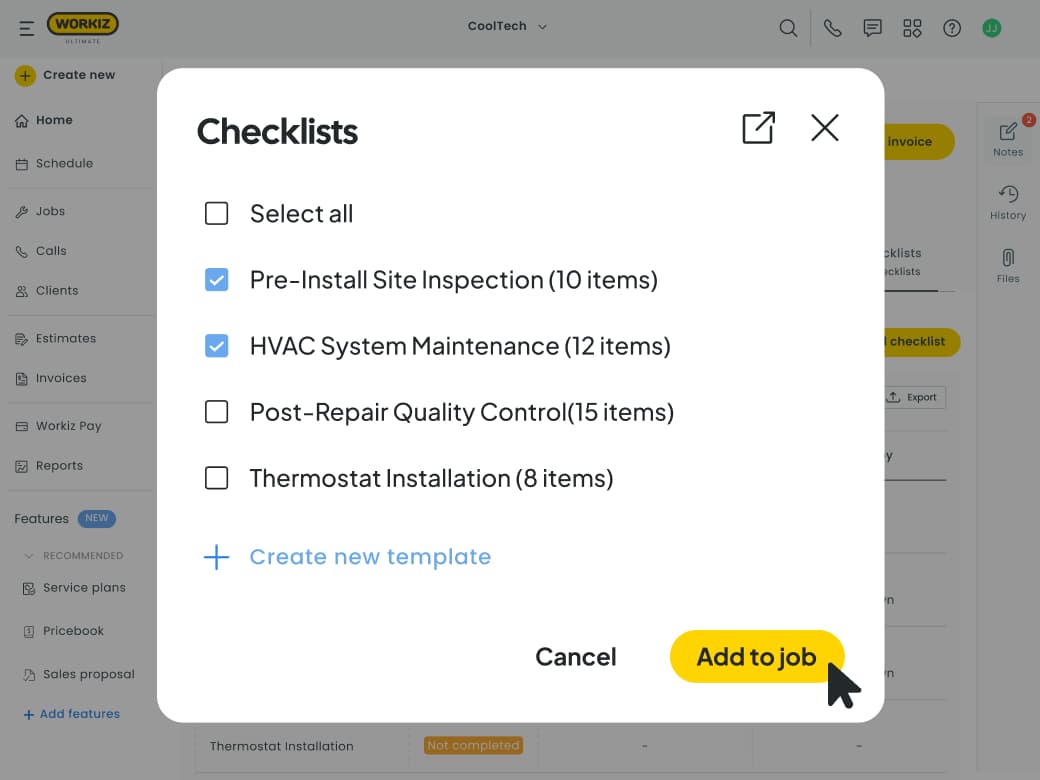
Create templates for quoting, installs, service calls and, maintenance visits, so your team always follow the most relevant workflow.
Get the job done right
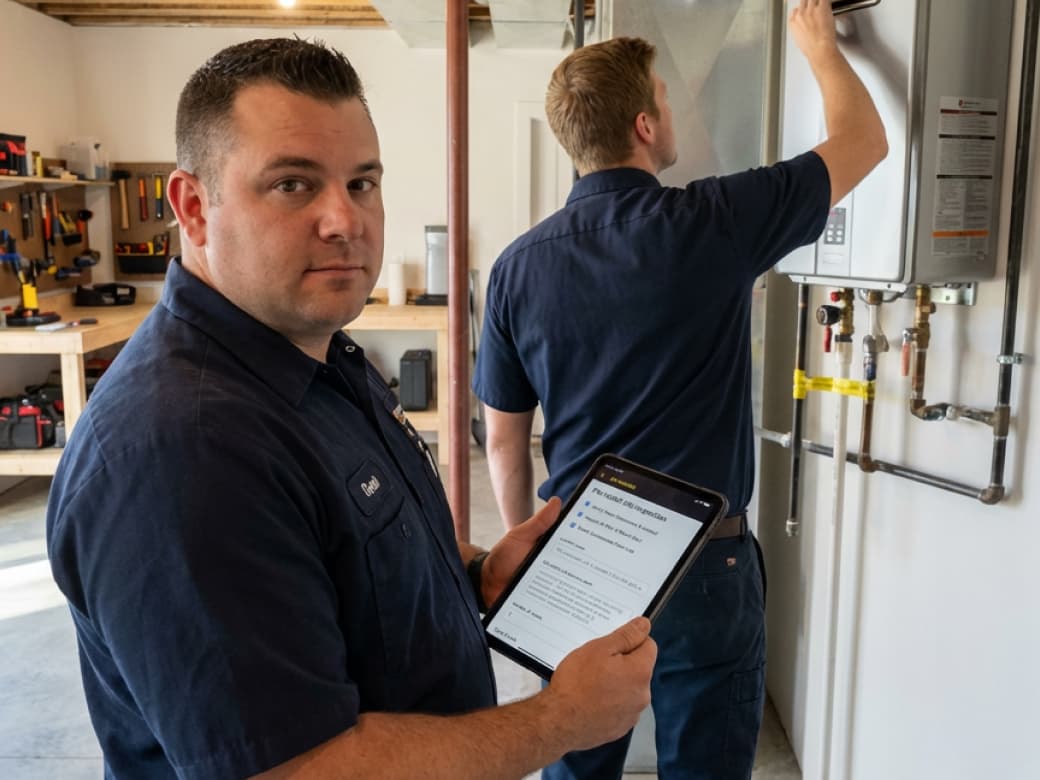
Going back to fix mistakes eats away at your profits, and reputation. Checklists helps techs do the job right the first time so you don’t need to go back and clean up their mess.
Boost revenue
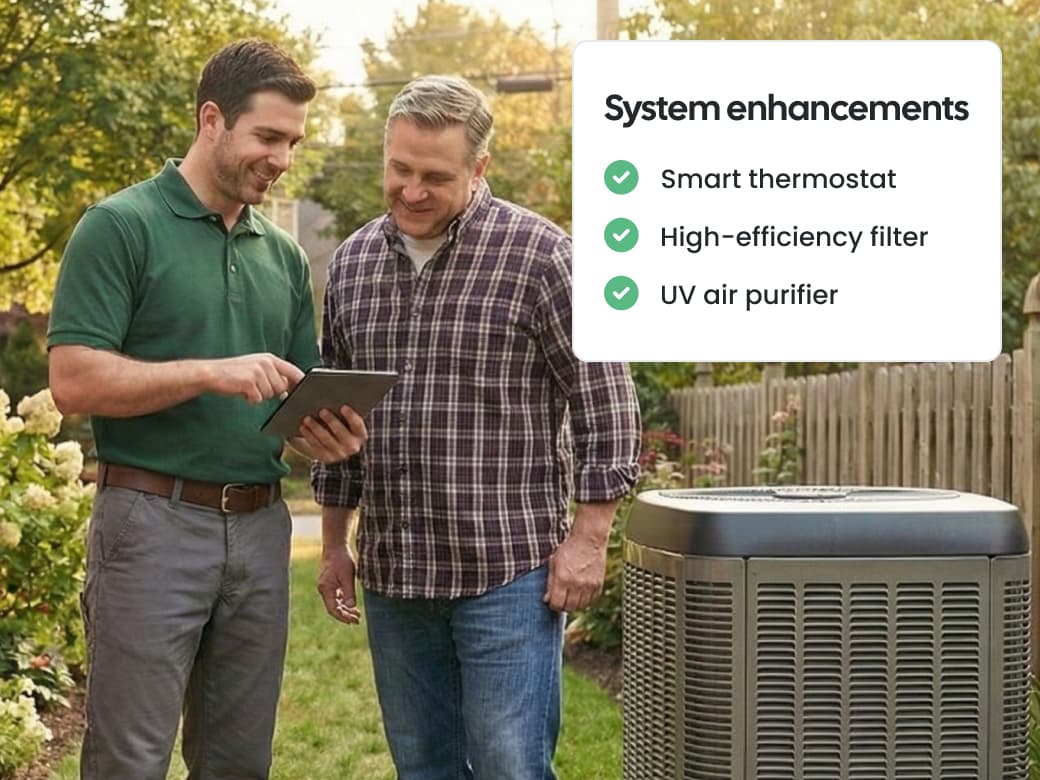
Help techs spot and offer add-ons when quoting. Don’t hope for upsells, build them into the workflow so techs know what to look for.
Guarantee consistency
Reduce callbacks and keep your reputation solid by standardizing the steps that all your techs follow every time.

Coach techs automatically
Turn your proven processes into step-by-step guides so even your new techs perform like your top guys right away.
Reduce screw ups
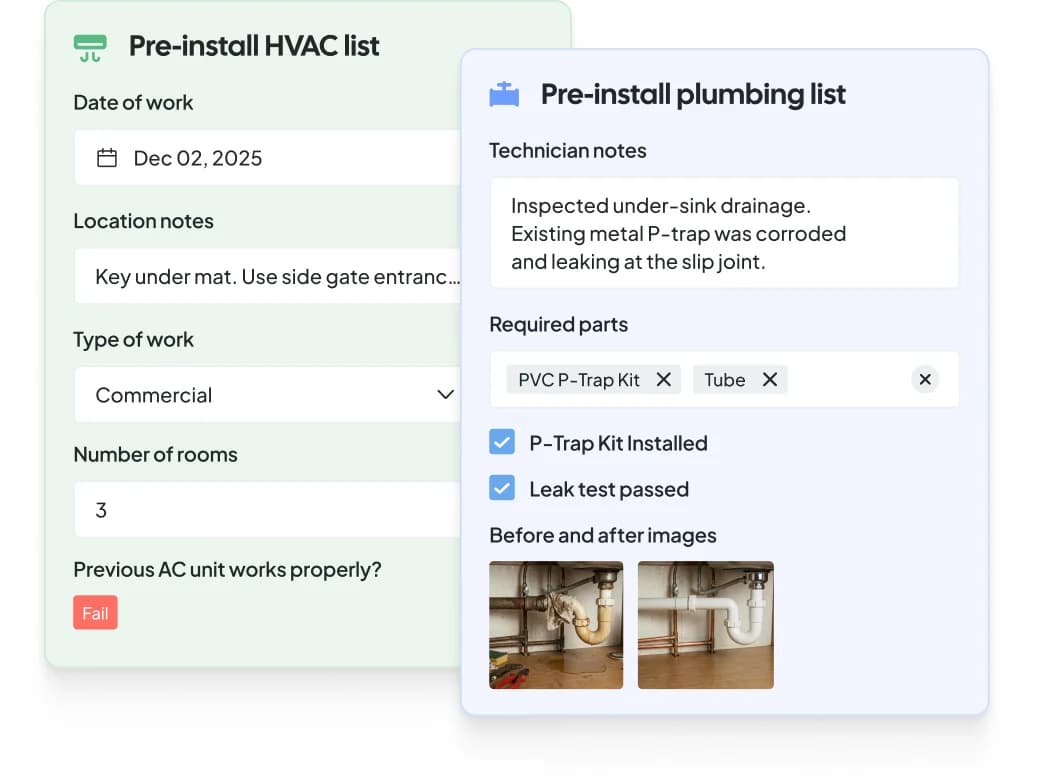
Prevent missed tasks and bad work by requiring pics, notes, and confirmation that even the small tasks were handled.

Build trust and loyalty
Walk customers through the completed checklists, boosting your professionalism by showing them clear proof of work.
One portal. One login. Every tool to fill the calendar and keep the trucks moving.
AI answering instantly handles your calls, emails, and texts. It talks to clients, books jobs, and dispatches the right tech without any human intervention.
A built-in marketing suite that uses your live job data in marketing campaigns, and protects your online reputation by flagging bad reviews as soon as they hit.
An embedded phone system that gives you actionable insights from your calls — like your true job win rate, why leads say no, and how dispatchers can improve.
Smart scheduling and dispatching that keeps your team efficient, optimally routed and running on time.
Professional invoices that let clients pay by credit card, mobile wallet, ACH, cash, check, and consumer financing.
Automate tasks with ‘when this happens, do that’ rules. For example, ‘When an invoice is due, send client an SMS’.
The biggest value is really being able to pinpoint the revenue generated from a campaign. I didn’t get that with Mailchimp.
Liz Ramirez
Marketing Manager, Gold Eagle Services
Workiz helps you gather all this information in a very easy and professional way.
Robert
CEO, HR Locksmith 24/7
We use it all day. Everyday. It's incredible.
Shawn Fago
CEO, Noble Locksmith

I always recommend Workiz. It's incredible and has doubled our bookings and sales.
Christian Fowler
Co-founder, Junk Doctors
I've yet to see anything better than Workiz. You have all you need to make wise business decisions.
Lee Godbold
Founder, Junk Doctors, Junk Removal Authority

Best bang for your buck field service management software! No more pen and paper.
Andrew Knicley
HVAC company owner, All-Air Systems
Since we started with Workiz, my company has grown 3 times in revenue every year.
Yuriy Dyomkin
Owner, Garage Door Ninja
Workiz makes booking our appointments super easy.
Theodore Proia
Owner, JDog Junk Removal & Hauling, Elkridge, MD

Our scheduling has improved and retention rates on jobs have increased by 10%
Tega
Owner of Removerz
We've seen a massive growth with Workiz
Jerry Flanagan
CEO and co-founder of JDog
Workiz is significantly impactful for my franchise business
Thomas Scott
Founder & CEO, Home Run Franchises
Workiz makes my business run a lot smoother!
James Thornton
Owner of Cupid disposal

Workiz completely automated my business, making management easier and more efficient than ever!
Omer
Owner of Best Pro Services

Workiz makes my life a lot easier!
Chris Heenan
Owner of AvaAir Heating and cooling

The only thing I use for my business is Workiz
Titus Zeigler
Owner of Haul Away Junk Removal
Workiz is the core of my business
Roi Tapiaro
Owner of Must Air USA
My whole business is all in one place
Mitch Harrison
Founder, CEO of Junk Masters
Workiz is the best system out there
Shane Miller
Marketing specialist at Junk Removal Authority
Workiz saved our company 20 hours a week!
Melissa Carvajal Perez
Operations manager, Carvajal AC


Workiz continuously improves their product, making it easy for us to recommend and benefit from the partnership.
Matt Merry
Operations, Junk Removal Authority
Workiz helped us generate unexpected, extra income.
Matthew Vick
Owner, Sonoma Strong Hauling & Junk Removal
It has been the best platform that I have used in 25 years in being in business.
Dan Johnson
CEO, Einstein Pros

The payment process is very seamless and all integrated into one.
John-Michael Williams
Owner, AC Panda Mechanical Contractors
I've used over 10 CRMs and Workiz is the #1 tool in my toolkit
Ben Bergloff
Owner of Epic Exterior Services
We chose Workiz because the UI is simple & easy to learn.
Kristen Zinzi
Administrator at County Comfort Home Solutions

With Workiz I was able to expand my small business into multiple locations & over 100 employees.
Jacob Szender
CEO of Sure Lock & Key
Workiz’s support delivers prompt, effective solutions, making it exceptional.
Antonia Vicens
Owner of JDog Junk Removal, GA
Workiz streamlined processes, automating tasks and updates.
Rayah Gilliland
Director of Administration Tulsa Christian Bros Painting

Workiz streamlined our business with digital estimates, invoices, and phone integration.
Olga White
Manager at Instafix Appliance Repair

Workiz simplified our business with automation, boosting growth.
Miguel Contreras
Owner and CEO at Bros Pro Hauling
Workiz is a game changer, keeping our company organized and everyone in constant contact.
Brian McLemore
Owner of Next Level Renovations

With Workiz, our team feels like we're always working in one office, no matter where we are.
Jenny Will
Sales manager at Junk Out Now
Workiz has been our secret weapon for scaling effortlessly.
Andrew Warkentine
Owner of Top Dawg Junk Removal
Workiz transformed our business with streamlined scheduling, payments, and communication.
Yedil Rakhmet
Owner of Bumsi Junk Removal
Workiz is fantastic! It manages scheduling, job creation, and leads, keeping our technicians informed and customers happy.
Kristine Taylor
Air Flows Chicago

I switched to Workiz from Service Titan in summer 2023 and have loved it ever since.
Jed Green
Co-owner of NexLvl Services
Workiz simplified scheduling and billing, boosting our efficiency.
Brian Harding
Élecproménager
Workiz integrates everything, from communication to payments, and has been our go-to for over four years.
Trevoy Dunn
Dedicated Mold Specialists
I used to run my business on paper, but Workiz lets me track all my jobs in one place digitally.
Ron Dahari
CEO at Superior Garage Door
We are getting so many 5-star reviews and more business!
Mike Bryant
CEO at Plumbing 365

Workiz has saved me thousands and thousands of hours in time
Wayne Winton
Owner Tri County Locksmith Service

Workiz transformed my business—saving time on scheduling, invoicing, and hiring.
Mike Landry
Owner, Landry Services LLC
Workiz helps me get paid faster—instant invoices, easier growth!
Don Taylor
Sales Manager Woodson & Bozeman Memphis

Jessica is phenomenal - she gets the client before the next guy would’ve, instead of losing them to voicemail.
Nick Tellie
We Love Junk
It's so easy to add jobs, send invoices and get paid all in one place
Elisha Robinson
Bob’s Plumbing, Heating & A/C LLC
Genius Answering transformed how we handle calls and book jobs!
George Galanis
Director of Operations at Air Flows Air Duct Services

Workiz keeps our business running smoothly—it's a game-changer!
Bill McHugh
McHugh Junk Removal
Workiz makes my HVAC business more efficient and profitable
Muneeb Chaudhry
Owner at HVAC Worx LLC
Workiz gives us everything we need to run our business seamlessly.
Hector Perez
Fidelis Repairs
Workiz makes running a business seamless—no more paperwork, easy payments, and automated customer follow-ups!
Brian Orchard
Owner at Everett Air

Since using Workiz, we’ve been able to take on more jobs, stay organized, and keep our customers happier than ever.
Filipe Souza
Owner at SmarTech Solutions
Workiz made our operations faster, smoother, and boosted customer satisfaction.
Gus Velasco
COIT Cleaning & Restoration

With Workiz, our growth skyrocketed over 300% — everything’s faster and easier now.
Rafael Roa
Appliances USA Pro
Workiz keeps our business running smooth—faster estimates, happy customers, and techs who get more done.
Dan and Wyatt Johnson
Einstein Pros
Workiz keeps our team efficient, organized, and ready to grow without anything slipping through the cracks.
Mike Gidich
Owner at Honey Dudes Handyman

Workiz is powerful yet simple—helping us save time, win more jobs, and stand out from the competition.
Keating Kuhn
Gold Eagle Services

Workiz helps us ensure our customers get a great experience from the first call to the final invoice.
Lior Mizrahi
Same Day Garage Door Services & Repair

This is more than just a user-friendly work management app, it's a simple, customizable solution for all your HVAC business needs.
Dan Kadosh
co-founder Workiz
Workiz Checklists are step-by-step workflows your technicians follow on every job. They standardize how work gets done, ensure consistent quality across your team, and help techs identify upsell opportunities that boost ticket size.
Checklists keep your team organized, on task, and accountable — no matter who’s on the job or how many years of experience they have with your way of doing things.
Checklists appear right inside each job so your techs can follow clear steps, upload required photos, add notes, and confirm completed tasks before closing out the job.
Owners and managers build the checklist once, and every tech on your team follows the same repeatable workflow. Workiz automatically logs all steps, ensuring nothing gets missed and giving customers transparent proof of work.
Checklists guide techs through consistent inspections and upsell paths, like offering to enroll customers into service plans, checking eligibility for extended warranties, and asking the customer if they need any other work done.
Instead of upsells being “hit or miss,” every tech knows exactly what to look for, what questions to ask, and what to recommend. That leads to higher ticket sizes, more add-ons, and more lifetime value per customer.
Whether you have one tech or twenty, consistency builds your reputation.
Checklists ensure every job — from tune-ups to installations — is done the same way, every time. Techs follow the same workflow, take the required photos, and capture the same documentation, dramatically reducing callbacks and boosting 5-star reviews and word-of-mouth referrals.
Yes, this is a big benefit. Instead of shadowing for weeks, new techs get step-by-step instructions for every job type. The checklist becomes the playbook: what to inspect, what to document, what to upsell, and how to close out a job. Even if the new hire has years of experience, checklists help them ramp faster to your unique processes, boosting their performance from day one.
Absolutely. Requiring photos, notes, and confirmations ensures techs don’t skip steps — especially the small details that lead to expensive callbacks or compliance issues. This also creates a clear audit trail with time-stamped proof of work.
Yes, and customers love it. When the job is done, techs can walk customers through everything completed, with photos included. This increases trust, improves transparency, and gives customers confidence that the job was done right.
It’s one of the easiest ways to boost professionalism and reduce disputes.
Checklists are designed for any field service teams that wants their techs (or office admins) to follow your thought through processes in order to serve your customers with a consistent level of quality and make more money.
Yes. Techs complete checklists right from the Workiz mobile app. The photos uploaded, notes added, and status updates sync instantly with the office.
You can build a checklist from scratch or copy one from your pre-made templates. Just choose the job type, add the steps you want your techs to follow, require photos or notes where needed, and assign it. Your entire team will see the updated version instantly.