

The biggest value is really being able to pinpoint the revenue generated from a campaign. I didn’t get that with Mailchimp.
Liz Ramirez
Marketing Manager, Gold Eagle Services

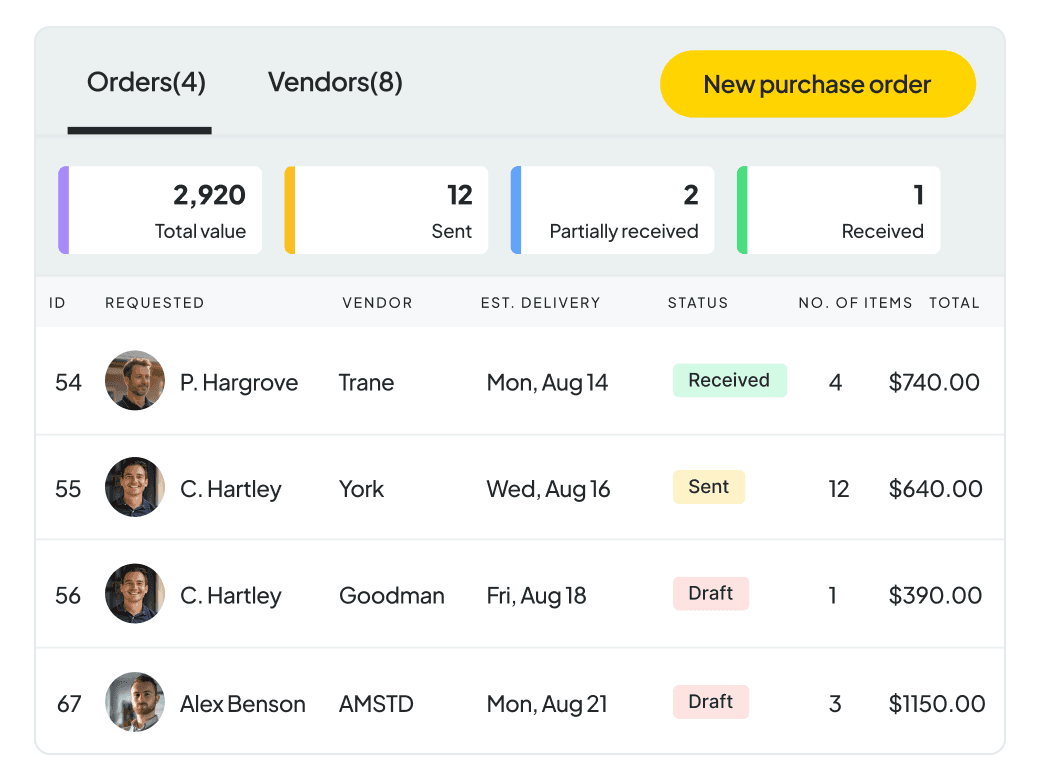
PURCHASE ORDERS
Quickly create and send purchase orders for specific vendors. Manage vendor information, link orders to your price book items, and connect order items to relevant jobs.
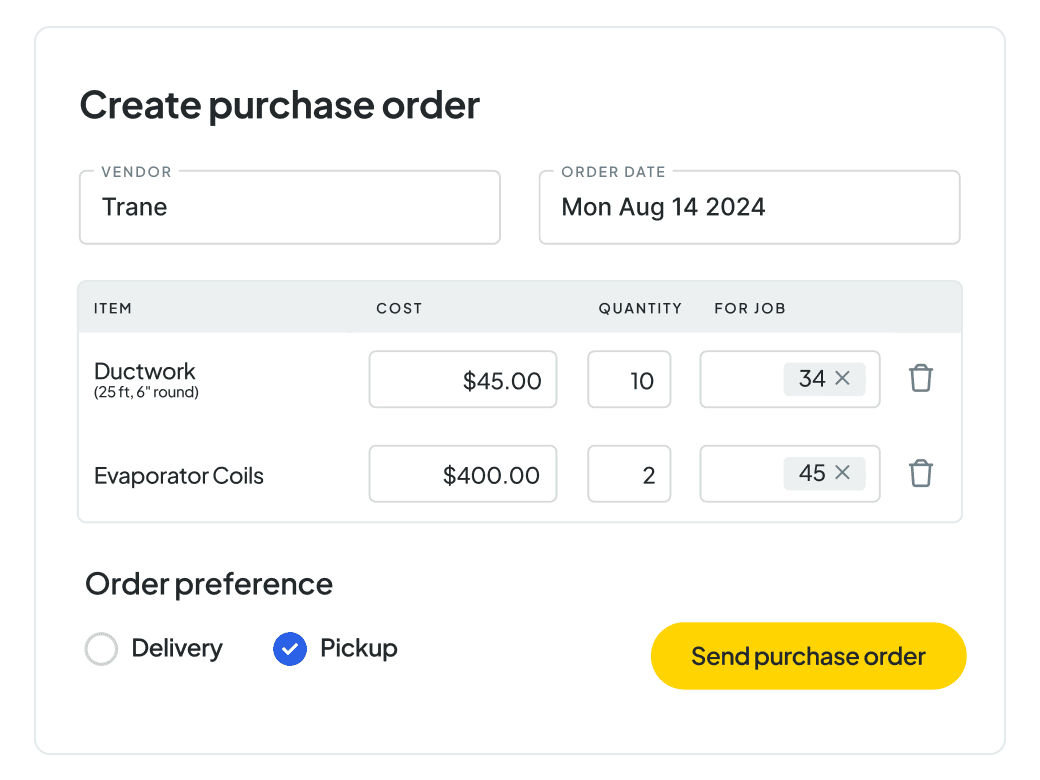
ORDER MANAGEMENT
Track orders with pickup or delivery details at your fingertips. Monitor and update purchase order statuses, from orders sent to items delivered, ensuring full visibility and reducing errors.
The biggest value is really being able to pinpoint the revenue generated from a campaign. I didn’t get that with Mailchimp.
Liz Ramirez
Marketing Manager, Gold Eagle Services
Workiz helps you gather all this information in a very easy and professional way.
Robert
CEO, HR Locksmith 24/7

We use it all day. Everyday. It's incredible.
Shawn Fago
CEO, Noble Locksmith

I always recommend Workiz. It's incredible and has doubled our bookings and sales.
Christian Fowler
Co-founder, Junk Doctors
I've yet to see anything better than Workiz. You have all you need to make wise business decisions.
Lee Godbold
Founder, Junk Doctors, Junk Removal Authority

Best bang for your buck field service management software! No more pen and paper.
Andrew Knicley
HVAC company owner, All-Air Systems

Since we started with Workiz, my company has grown 3 times in revenue every year.
Yuriy Dyomkin
Owner, Garage Door Ninja

Workiz makes booking our appointments super easy.
Theodore Proia
Owner, JDog Junk Removal & Hauling, Elkridge, MD

Our scheduling has improved and retention rates on jobs have increased by 10%
Tega
Owner of Removerz
We've seen a massive growth with Workiz
Jerry Flanagan
CEO and co-founder of JDog

Workiz is significantly impactful for my franchise business
Thomas Scott
Founder & CEO, Home Run Franchises
Workiz makes my business run a lot smoother!
James Thornton
Owner of Cupid disposal

Workiz completely automated my business, making management easier and more efficient than ever!
Omer
Owner of Best Pro Services

Workiz makes my life a lot easier!
Chris Heenan
Owner of AvaAir Heating and cooling

The only thing I use for my business is Workiz
Titus Zeigler
Owner of Haul Away Junk Removal
Workiz is the core of my business
Roi Tapiaro
Owner of Must Air USA

My whole business is all in one place
Mitch Harrison
Founder, CEO of Junk Masters

Workiz is the best system out there
Shane Miller
Marketing specialist at Junk Removal Authority

Workiz saved our company 20 hours a week!
Melissa Carvajal Perez
Operations manager, Carvajal AC


Workiz continuously improves their product, making it easy for us to recommend and benefit from the partnership.
Matt Merry
Operations, Junk Removal Authority

Workiz helped us generate unexpected, extra income.
Matthew Vick
Owner, Sonoma Strong Hauling & Junk Removal
It has been the best platform that I have used in 25 years in being in business.
Dan Johnson
CEO, Einstein Pros

The payment process is very seamless and all integrated into one.
John-Michael Williams
Owner, AC Panda Mechanical Contractors
I've used over 10 CRMs and Workiz is the #1 tool in my toolkit
Ben Bergloff
Owner of Epic Exterior Services
We chose Workiz because the UI is simple & easy to learn.
Kristen Zinzi
Administrator at County Comfort Home Solutions

With Workiz I was able to expand my small business into multiple locations & over 100 employees.
Jacob Szender
CEO of Sure Lock & Key
Workiz’s support delivers prompt, effective solutions, making it exceptional.
Antonia Vicens
Owner of JDog Junk Removal, GA

Workiz streamlined processes, automating tasks and updates.
Rayah Gilliland
Director of Administration Tulsa Christian Bros Painting

Workiz streamlined our business with digital estimates, invoices, and phone integration.
Olga White
Manager at Instafix Appliance Repair


Workiz simplified our business with automation, boosting growth.
Miguel Contreras
Owner and CEO at Bros Pro Hauling

Workiz is a game changer, keeping our company organized and everyone in constant contact.
Brian McLemore
Owner of Next Level Renovations

With Workiz, our team feels like we're always working in one office, no matter where we are.
Jenny Will
Sales manager at Junk Out Now

Workiz has been our secret weapon for scaling effortlessly.
Andrew Warkentine
Owner of Top Dawg Junk Removal
Workiz transformed our business with streamlined scheduling, payments, and communication.
Yedil Rakhmet
Owner of Bumsi Junk Removal

Workiz is fantastic! It manages scheduling, job creation, and leads, keeping our technicians informed and customers happy.
Kristine Taylor
Air Flows Chicago

I switched to Workiz from Service Titan in summer 2023 and have loved it ever since.
Jed Green
Co-owner of NexLvl Services
Workiz simplified scheduling and billing, boosting our efficiency.
Brian Harding
Élecproménager
Workiz integrates everything, from communication to payments, and has been our go-to for over four years.
Trevoy Dunn
Dedicated Mold Specialists

I used to run my business on paper, but Workiz lets me track all my jobs in one place digitally.
Ron Dahari
CEO at Superior Garage Door
We are getting so many 5-star reviews and more business!
Mike Bryant
CEO at Plumbing 365

Workiz has saved me thousands and thousands of hours in time
Wayne Winton
Owner Tri County Locksmith Service

Workiz transformed my business—saving time on scheduling, invoicing, and hiring.
Mike Landry
Owner, Landry Services LLC
Workiz helps me get paid faster—instant invoices, easier growth!
Don Taylor
Sales Manager Woodson & Bozeman Memphis

Jessica is phenomenal - she gets the client before the next guy would’ve, instead of losing them to voicemail.
Nick Tellie
We Love Junk

It's so easy to add jobs, send invoices and get paid all in one place
Elisha Robinson
Bob’s Plumbing, Heating & A/C LLC

Genius Answering transformed how we handle calls and book jobs!
George Galanis
Director of Operations at Air Flows Air Duct Services

Workiz keeps our business running smoothly—it's a game-changer!
Bill McHugh
McHugh Junk Removal

Workiz makes my HVAC business more efficient and profitable
Muneeb Chaudhry
Owner at HVAC Worx LLC
Workiz gives us everything we need to run our business seamlessly.
Hector Perez
Fidelis Repairs
Workiz makes running a business seamless—no more paperwork, easy payments, and automated customer follow-ups!
Brian Orchard
Owner at Everett Air

Since using Workiz, we’ve been able to take on more jobs, stay organized, and keep our customers happier than ever.
Filipe Souza
Owner at SmarTech Solutions

Workiz made our operations faster, smoother, and boosted customer satisfaction.
Gus Velasco
COIT Cleaning & Restoration

With Workiz, our growth skyrocketed over 300% — everything’s faster and easier now.
Rafael Roa
Appliances USA Pro

Workiz keeps our business running smooth—faster estimates, happy customers, and techs who get more done.
Dan and Wyatt Johnson
Einstein Pros
Workiz keeps our team efficient, organized, and ready to grow without anything slipping through the cracks.
Mike Gidich
Owner at Honey Dudes Handyman

Workiz is powerful yet simple—helping us save time, win more jobs, and stand out from the competition.
Keating Kuhn
Gold Eagle Services

Workiz helps us ensure our customers get a great experience from the first call to the final invoice.
Lior Mizrahi
Same Day Garage Door Services & Repair

This is more than just a user-friendly work management app, it's a simple, customizable solution for all your HVAC business needs.
Dan Kadosh
co-founder Workiz
Workiz Purchase Orders help you order, track and manage materials, equipment, and supplies for your business or for specific jobs. You can create POs, assign them to vendors, and track delivery statuses—all within your Workiz account.
Workiz Client Portal saves you time and reduces back-and-forths by giving customers a way to take action without needing to download, print, and scan documents, or calling your office. For example, clients can view, accept, and sign proposals right from their portal. It also lets clients pay you partially or fully online, so you’re already paid before you get on-site. Workiz Client Portal adds transparency, shortens the time to get approvals, helps you get paid faster, and ensures clients always have access to the info they need.
Simply create a Purchase Order when you need to order items, and send the PO to the vendor right from your Workiz account. You can specify the vendor, item list, quantities, and costs. Once sent to the vendor, the PO is saved and you can track the status through ordered, received, or returned.
Keep costs organized and accurate Ensure materials are ordered and delivered on time Prevent lost paperwork or miscommunication with vendors Easily track which jobs have outstanding material needs Maintain clearer profit margins per job
Yes. POs can be tied to a job in your Workiz account, so you always know what was ordered, why, and for which customer. It keeps materials and costs aligned with your billing and job records.
Yes. You can update each PO’s status to reflect whether it s pending, ordered, received, or returned. This helps your team avoid duplicate orders and ensures you re not missing key materials before a job starts.
Absolutely. Item costs from your POs are reflected in your job’s financial summary. This helps you monitor job profitability and flag cost overruns early.
Yes. You can select from your saved vendors or add new ones, and assign different tax rates as needed per item or vendor—perfect for managing a variety of suppliers.